
Schema & Structure
The schema tree (schemas → tables/views → columns) is lazy-loaded and shared with the SQL autocomplete. Refresh it any time; right-click a node for actions.
Inspect a table
Open a table's Structure view to see its columns, keys, and indexes, plus a reconstructed CREATE TABLE. For Postgres you also get a live server dashboard — sessions, locks, and connection load.
Create and alter, safely
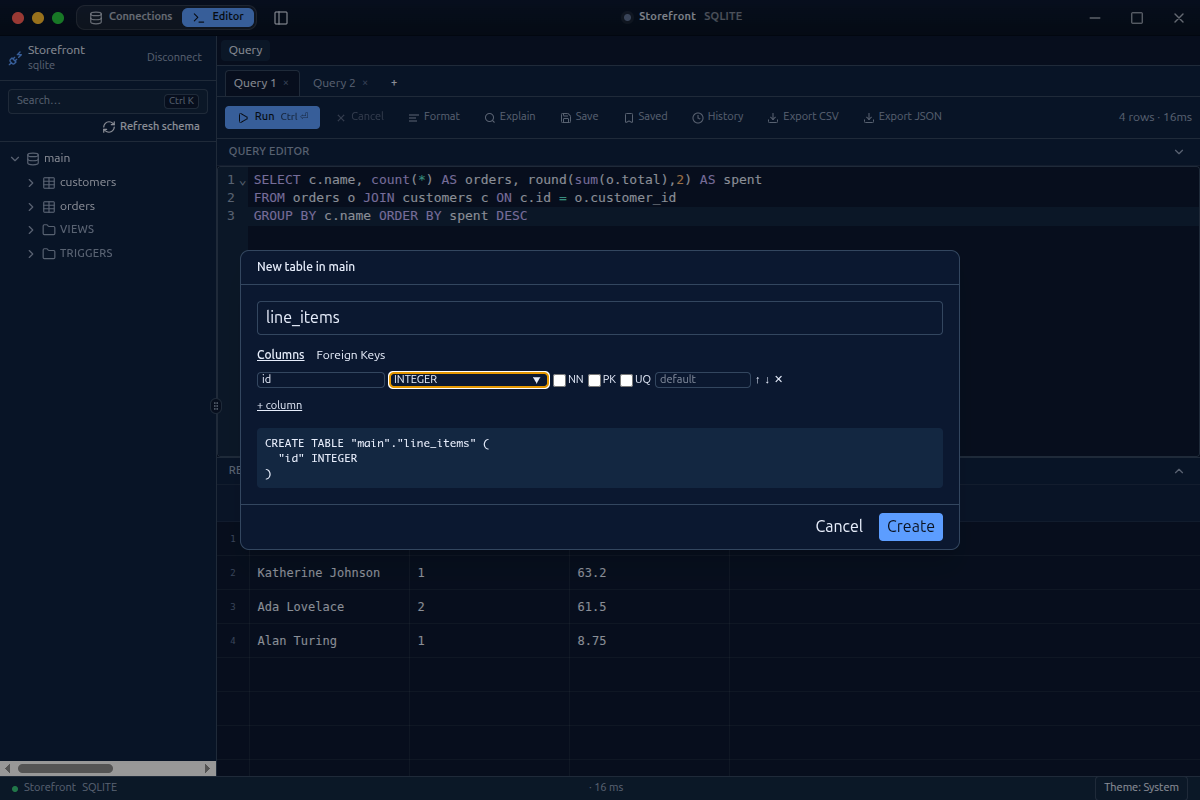
Everything that changes structure is generated as SQL, shown to you, and confirmed before it runs — in a transaction where the engine supports it.
- Create tables with a tabbed designer: columns (name, type from a dropdown, nullable, primary key, unique, default, and generated expressions), check constraints, and a Foreign Keys tab whose reference dropdowns are populated from your schema. A live
CREATE TABLEpreview updates as you go. - Create databases (Postgres) with full metadata — owner, encoding, template, collation, tablespace, connection limit.
- Alter existing tables: add / rename / drop columns, change type/default/nullable, add or drop indexes and foreign keys, drop tables. Postgres alters in place; SQLite uses native
ALTERor a safe table-rebuild that preserves data, indexes, and constraints.
Schema depth (Postgres)
Beyond tables, Postgres exposes the objects a real schema needs — each generated as SQL and confirmed before it runs:
- Check constraints — list, add, and drop.
- Partial and expression indexes — an index on
lower(email), or one with aWHEREpredicate. - Sequences and materialized views — appear in the tree with their own create / drop, definition view, and
REFRESHfor matviews. - Functions and triggers — author or edit the definition in a raw-SQL editor, or drop.
- Table maintenance — run
VACUUM,ANALYZE, orREINDEXfrom a table's menu.
Roles & privileges (Postgres)
A Roles panel lists roles with their attributes and grants. Create, alter, and drop roles, and grant / revoke table privileges (SELECT, INSERT, UPDATE, DELETE, TRUNCATE, REFERENCES, TRIGGER, or ALL) — with a preview of the exact GRANT / REVOKE before it runs.
Connection security
Postgres connections support TLS with a client certificate, key, and CA (mutual TLS) and an SSH tunnel. The client private key is a secret — it lives in the OS keychain, never persisted in plaintext, and never reaches the renderer.
Next: MongoDB · Keyboard & Palette · Engines.